
Jenkins remains one of the most widely deployed CI/CD automation servers in the world — and for good reason. Its plugin ecosystem, flexibility, and deep integration with virtually every version control system, build tool, and cloud platform make it a practical choice for teams of all sizes. But that flexibility is a double-edged sword: poorly configured Jenkins pipelines are slow, brittle, and become maintenance burdens. In this guide, we share the practices that separate high-performing Jenkins setups from the ones that generate alert fatigue and late-night emergency fixes.
Start With Pipeline as Code: The Jenkinsfile
The single highest-impact change most teams can make is moving from GUI-configured freestyle jobs to declarative pipelines defined in a Jenkinsfile stored in the repository root. This shift alone solves a surprising number of common CI/CD problems at once.
When your pipeline lives in version control alongside your application code, every change to the build process is tracked, reviewed, and reversible. You know exactly when a pipeline configuration changed, who changed it, and why. You can test pipeline changes on a feature branch without affecting main. And onboarding a new repository becomes a matter of copying a Jenkinsfile rather than clicking through the Jenkins UI.
Declarative syntax is preferred over scripted for most pipelines because it provides a clear, validated structure:
pipeline {
  agent any
  stages {
    stage('Build') {
      steps { sh 'mvn package -DskipTests' }
    }
    stage('Test') {
      steps { sh 'mvn test' }
    }
    stage('Deploy') {
      when { branch 'main' }
      steps { sh './deploy.sh' }
    }
  }
  post {
    failure { mail to: 'team@example.com', subject: 'Build failed' }
  }
}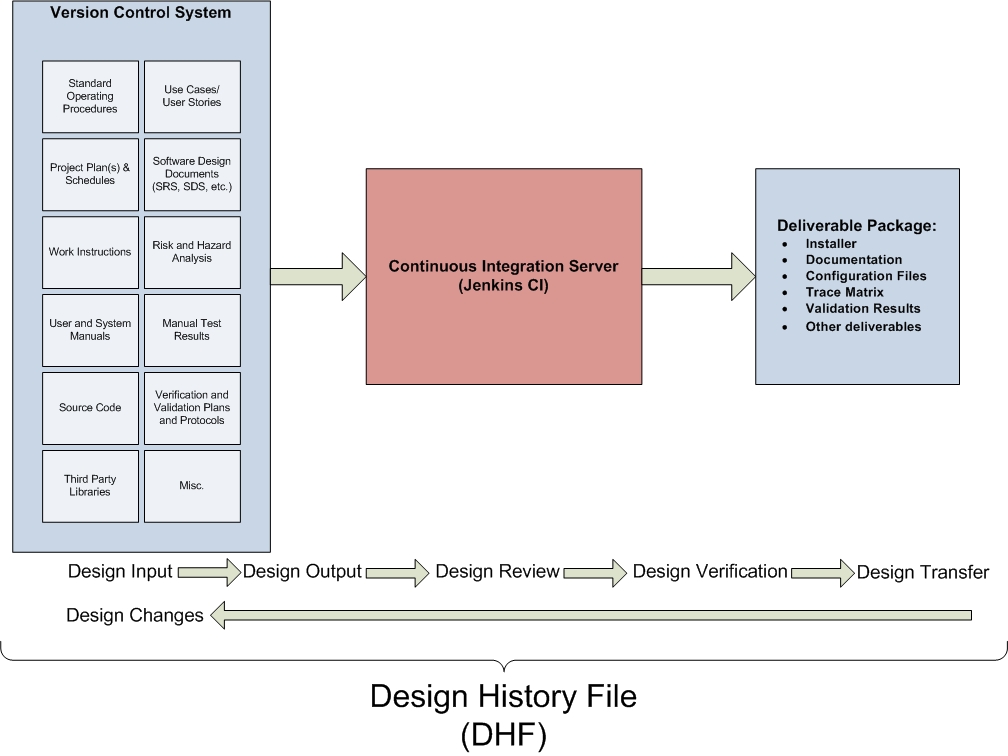
Image: File:Continuous-integration-dhf.jpg — Matthew.t.rupert (CC BY-SA 3.0), via Wikimedia Commons
Use Shared Libraries to Stop Copy-Pasting Pipeline Code
Once you have more than two or three Jenkinsfiles across multiple repositories, you will notice repetition. The same credential retrieval pattern, the same notification block, the same Docker build logic — duplicated everywhere. Jenkins Shared Libraries solve this properly.
A shared library lives in its own Git repository (typically named jenkins-shared-library) and exposes reusable Groovy functions that any pipeline can import. Teams typically centralize:
- Notification helpers (Slack, email, PagerDuty)
- Docker image build and push logic
- Security scanning steps
- Deployment helpers for specific environments
- Test reporting utilities
With a shared library configured, a pipeline can call @Library('my-shared-lib') _ at the top and then invoke notifySlack() or buildAndPushDocker() as first-class steps. When the shared function needs updating — say, you change your Slack webhook — you update it in one place, and all pipelines pick up the change on their next run.
Parallelize Stages to Cut Build Times
Sequential pipelines that run unit tests, integration tests, linting, security scans, and build steps one after another are common — and they are also the primary reason developers lose patience with CI. Jenkins declarative pipelines support native parallelism that can dramatically reduce wall-clock build time:
stage('Parallel Validation') {
  parallel {
    stage('Unit Tests') {
      steps { sh 'npm test -- --coverage' }
    }
    stage('Lint') {
      steps { sh 'npm run lint' }
    }
    stage('Security Scan') {
      steps { sh 'trivy fs --exit-code 1 .' }
    }
  }
}
The key is identifying which stages have no dependencies on each other's outputs. Unit tests, linting, and static security scanning typically have none — they all run on the same source code. Running them in parallel with three agents can cut what was a 15-minute sequential pipeline to under 6 minutes.
Managing Credentials Securely
The most common Jenkins security mistake is hardcoding credentials — API keys, Docker registry tokens, cloud provider secrets — directly in Jenkinsfiles or as plain-text environment variables. Jenkins provides a proper Credentials store for this, and using it is non-negotiable.
The pattern is straightforward: store secrets in Jenkins Credentials (under Manage Jenkins → Credentials), then reference them by ID in the pipeline using the withCredentials block or the credentials() binding helper. The secret value is never printed in logs, never stored in the Jenkinsfile, and access can be scoped to specific pipelines or folders.
| Practice | Why It Matters | Priority |
|---|---|---|
| Pipeline as Code (Jenkinsfile) | Version control, auditability, reproducibility | Critical — do this first |
| Jenkins Credentials Store | Prevents secret leakage in logs and Git | Critical — security requirement |
| Shared Libraries | Eliminates pipeline code duplication | High — essential for >3 repos |
| Parallel Stages | Reduces developer wait time, faster feedback | High — developer experience |
| Multibranch Pipeline | Automatic CI for every branch and PR | High — enables trunk-based dev |
| Agent Isolation and Cleanup | Prevents state leakage between builds | Medium — reliability |
Use Multibranch Pipelines for Automatic Coverage
Jenkins Multibranch Pipeline jobs automatically discover branches and pull requests in your repository and run CI against each one using the Jenkinsfile it finds. This eliminates the common failure mode where a developer merges untested code because they forgot to run CI on their branch.
When combined with branch protection rules in GitHub, GitLab, or Bitbucket — requiring the Jenkins status check to pass before a PR can merge — you get automatic enforcement without any manual process. Every branch gets a build. Every PR gets a status. No exceptions.
Build Agent Strategy: Clean Environments Per Build
Shared build agents that accumulate state across builds are a significant source of "works on my machine, fails on CI" problems. Leftover test databases, cached credentials, partial Docker layers from failed builds, or files owned by root from previous runs can all cause intermittent failures that are maddeningly difficult to reproduce.
The modern best practice is ephemeral build agents: spin up a fresh container or VM for each build, run the pipeline, and destroy it when done. Jenkins supports this natively via the Kubernetes plugin (which creates a pod per build on your cluster) or via Docker agents in the pipeline definition:
pipeline {
  agent {
    docker {
      image 'node:20-alpine'
      args '-u root'
    }
  }
  stages { /* ... */ }
}
If ephemeral agents aren't feasible, at minimum add explicit workspace cleanup in your post block and run builds as a non-root user to prevent permission accumulation.
Frequently Asked Questions
When should I use declarative vs scripted pipeline syntax?
Default to declarative syntax — it validates structure before running, is easier to read, and has better IDE support and documentation. Use scripted syntax only when you need dynamic logic that declarative cannot express, such as generating stages programmatically from a list of targets. Even then, consider whether a shared library function with a scripted implementation, called from a declarative Jenkinsfile, gives you the best of both worlds.
How do I handle different configurations for different environments?
Use a combination of Jenkins Credentials (for secrets), parameterized pipelines (for environment selection), and environment-specific configuration files committed to the repo (for non-secret config). Avoid environment-specific Jenkinsfiles per environment — instead use when conditions, environment blocks, and conditional stages to branch behavior based on the target environment within a single pipeline definition.
Should I update Jenkins and its plugins frequently?
Yes, with a tested upgrade path. Jenkins and its plugin ecosystem receive regular security patches, and running outdated versions creates real vulnerability exposure. The recommended practice is to run a non-production Jenkins instance, apply updates there first, validate your most critical pipelines, and then promote to production. The Jenkins LTS (Long-Term Support) release line is the appropriate choice for production — it receives backported security fixes without the churn of weekly releases.
Bottom Line
Well-configured Jenkins pipelines are a genuine competitive advantage: they give teams fast, reliable feedback, prevent broken code from reaching production, and automate the tedious parts of software delivery. The most impactful practices — Pipeline as Code, Shared Libraries, credential security, and parallelism — compound on each other. Start with a Jenkinsfile if you haven't already. Add credential binding next if secrets are anywhere in plain text. Then invest in shared libraries once you have more than two or three repositories. Each step makes your pipeline more reliable, more auditable, and significantly easier to maintain.
Sources & References:
Jenkins Pipeline Documentation — jenkins.io official reference
Jenkins Shared Libraries — jenkins.io official reference
Using Credentials in Jenkins — jenkins.io official reference
Disclaimer: This article is for informational purposes only. Technology landscapes change rapidly; verify information with official sources before making technical decisions.